Advanced Benchmarking
"It matches" tells you a regex is correct. It tells you nothing about whether it is safe to ship.
A pattern that runs in microseconds on your test string can take seconds on a crafted one. That is not theoretical: catastrophic backtracking has taken down production systems at companies that know exactly what they are doing. Advanced Benchmarking is where you find out before the input does it for you.
What it measures
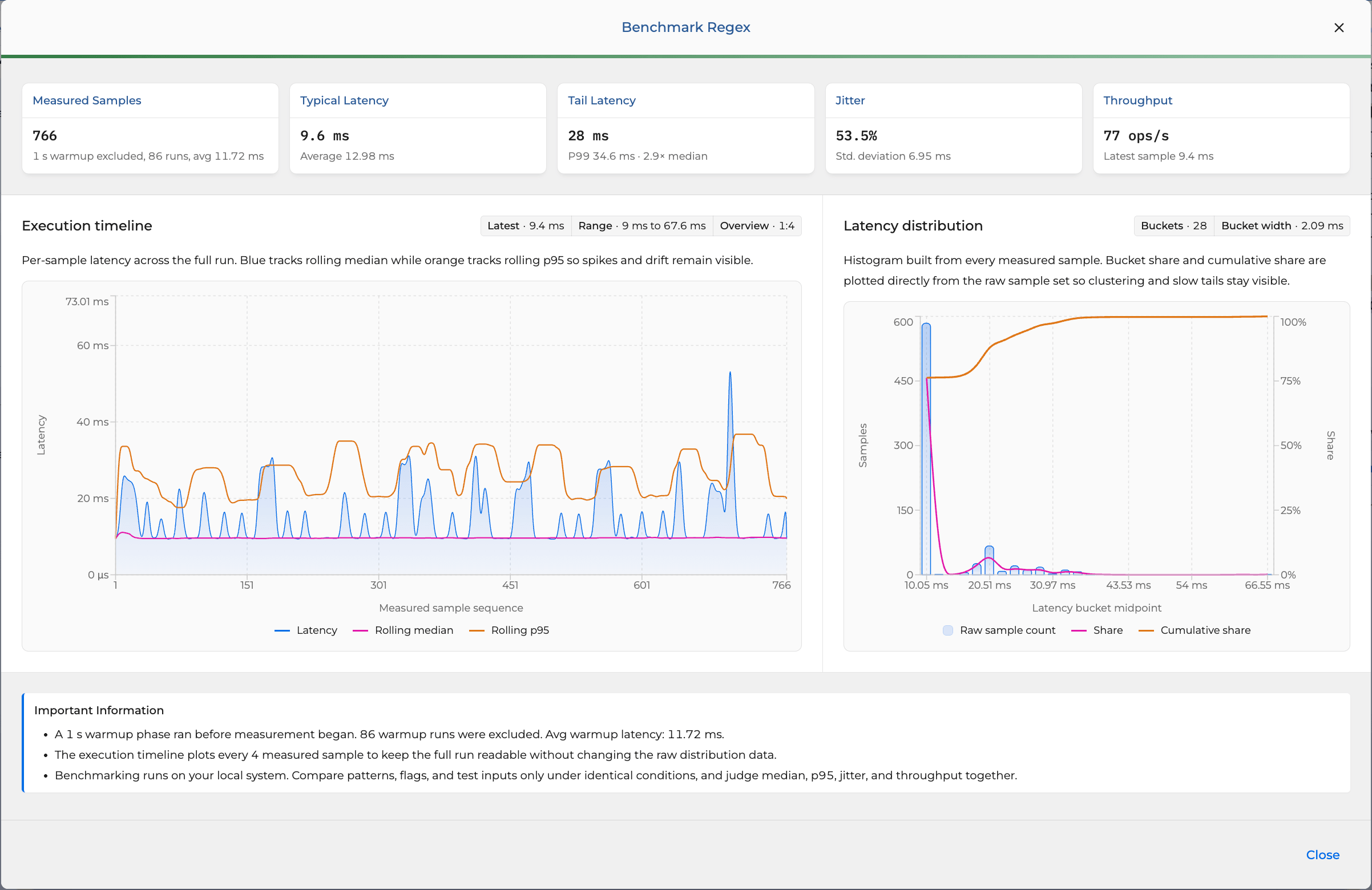
Run any pattern against the input that matters and get a full latency profile, not a single number:
- Typical latency: median and average per execution, so a handful of slow runs cannot hide the common case.
- Tail latency: P99 and the worst sample, reported as a multiple of the median. This is the number that pages you at 3am.
- Jitter: standard deviation and spread, so you can tell "consistently 10ms" from "10ms most of the time, 200ms sometimes."
- Throughput: operations per second, for capacity planning on a hot path.
- Sample count: hundreds of measured runs with a warmup phase excluded, so JIT and cache warmup do not skew the result.
What you see
Two charts, built from every raw sample, not a smoothed summary that hides the spikes:
- Execution timeline: per-sample latency across the whole run, with rolling median and rolling p95 overlaid. Backtracking blowups and gradual drift show up as exactly what they are, instead of being buried in an average.
- Latency distribution: a histogram with cumulative share. See at a glance whether your pattern is tightly clustered or has a long, slow tail eating your p99.
Where it earns its keep
- Hot-path patterns: validation, parsing, routing, and filtering that run on every request.
- Untrusted input: anything matching user-supplied strings, where one adversarial payload is a denial of service.
- Security and abuse review: catch ReDoS before it ships, with numbers instead of a hunch.
- Tuning before release: change a quantifier, rerun, and see in the timeline whether it actually helped.
- Comparing approaches: benchmark two patterns under identical conditions and let median, p95, jitter, and throughput settle the argument.
How to read a run
Benchmarks run on your own machine, so judge the shape, not just the headline number. A low median with a 30x tail is a pattern waiting to fail on the wrong input. Compare patterns, flags, and test strings only under identical conditions, and weigh median, p95, jitter, and throughput together; any one of them alone can lie.
Summary
Advanced Benchmarking is the difference between "the regex looks fine" and "I know how this regex behaves on the worst input it will ever see." If a pattern sits on a hot path or touches untrusted data, that is not a nice-to-have.